Hello!
Today i will try to show you how to censor a picture.
First i will chose a picture...
Now, select area that you want to censor. For example his face :
Now go to Filter - > Pixelate -> Mosaic and pixelate as much as you want .
At the end this guy will look like this:
Easy right ?
I hope this tutorial was helpful . See you next time. Good luck!
Bye!
Sunday, February 27, 2011
Photoshop Tutorial : Snow Effect !
Hello!
I will try to show you how to put snow in your pictures!
Now i selected " Chalk " brush from brush list ->
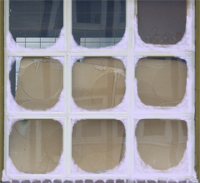
With this brush selected and opacity 23% start to paint until your picture looks like this:
Our picture starts to look like a frozen window right ?
Now we need to put some snow also in the center of every glass :
At the end you need to put a blue tint :
That's all. This is our final result. I hope this " tutorial " was helpful!
I will try to show you how to put snow in your pictures!
Now i selected " Chalk " brush from brush list ->
With this brush selected and opacity 23% start to paint until your picture looks like this:
Our picture starts to look like a frozen window right ?
Now we need to put some snow also in the center of every glass :
At the end you need to put a blue tint :
That's all. This is our final result. I hope this " tutorial " was helpful!
Saturday, February 26, 2011
About Photoshop
Adobe Photoshop is a graphics editing program developed and published by Adobe Systems Incorporated.
There are more versions of Photoshop :
- Adobe Photoshop CS3
- Adobe Photoshop CS4
- Adobe Photoshop CS5
Systems Requirements :
For Windows :
- Intel® Pentium® 4 or AMD Athlon® 64 processor
- Microsoft® Windows® XP with Service Pack 3; Windows Vista® Home Premium, Business, Ultimate, or Enterprise with Service Pack 1 (Service Pack 2 recommended); or Windows 7
- 1GB of RAM
- 1GB of available hard-disk space for installation; additional free space required during installation (cannot install on removable flash-based storage devices)
- 1024x768 display (1280x800 recommended) with qualified hardware-accelerated OpenGL graphics card, 16-bit color, and 256MB of VRAM
- Some GPU-accelerated features require graphics support for Shader Model 3.0 and OpenGL 2.0
- DVD-ROM drive
- QuickTime 7.6.2 software required for multimedia features
- Broadband Internet connection required for online services
For MAC OS:
- Multicore Intel processor
- Mac OS X v10.5.7 or v10.6
- 1GB of RAM
- 2GB of available hard-disk space for installation; additional free space required during installation (cannot install on a volume that uses a case-sensitive file system or on removable flash-based storage devices)
- 1024x768 display (1280x800 recommended) with qualified hardware-accelerated OpenGL graphics card, 16-bit color, and 256MB of VRAM
- Some GPU-accelerated features require graphics support for Shader Model 3.0 and OpenGL 2.0
- DVD-ROM drive
- QuickTime 7.6.2 software required for multimedia features
- Broadband Internet connection required for online services
Subscribe to:
Posts (Atom)